
Music Player & MP3 Player
InShot Inc.Music & Audio
4.755.35K Reviews
- Version
- 4.4.1.189
- Installs
- 100.00M
- Age Rating
- Everyone
Screenshots
Our Review of Music Player & MP3 Player
 Analysis by Appyee
I usually reach for an offline music player when I want my own audio files ready without building a streaming queue or relying on a connection. That’s the basic appeal of Music Player & MP3 Player: it gives a local collection a place to live, with listening controls and library tools in the same app. I’d consider it when I want to play tracks I already have, adjust how they sound, and make the everyday routine of choosing music less fiddly.
Starting with a local collection
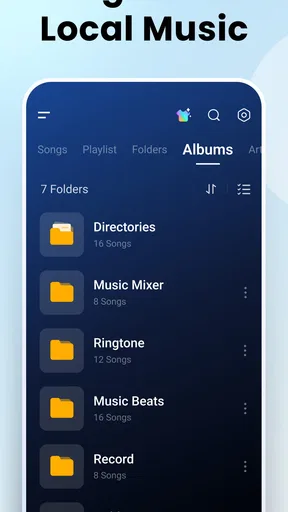
The first practical question is whether the music I care about is already available on my device. This app is aimed at playing offline audio, so it makes more sense for someone with saved tracks than for someone expecting a catalog of streamable albums. In my view, that distinction matters more than any theme or sound setting: a polished player cannot help much if the music you want is not part of your local library.
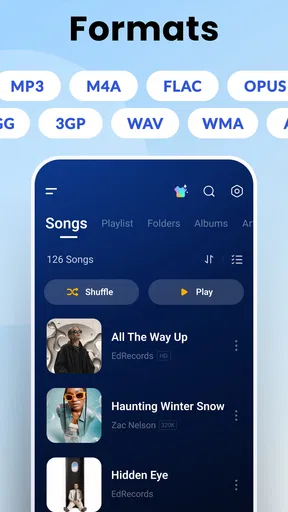
Once the tracks are accessible, I’d begin by checking how they appear in the library and whether their names and album details are readable. A tag editor can be useful here: if a file has an awkward title or inconsistent artist information, cleaning up its tags can make it easier to find later. I’d make those edits gradually, starting with the handful of songs I play most, rather than turning a listening app into a big metadata project.
Building a useful listening routine
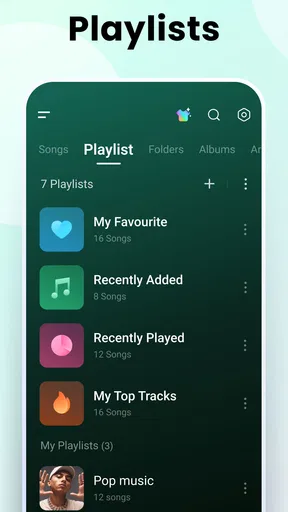
For a normal day, I’d use playlists to separate music by purpose instead of making one enormous queue. A short list for the commute, a calmer selection for winding down, or a group of familiar songs for a workout is easier to reach than searching the whole collection every time. The app’s appeal is strongest when it helps me get from “I have music saved” to “the right tracks are playing” with little effort.
That workflow also suits a practical handoff between activities. I might start a playlist at home, keep listening while doing chores, then switch to a different mood later without opening a streaming service or waiting for a connection. The trade-off is that an offline library needs a little care: if files are scattered, duplicated, or poorly labelled, I may have to tidy them before playlists feel dependable.
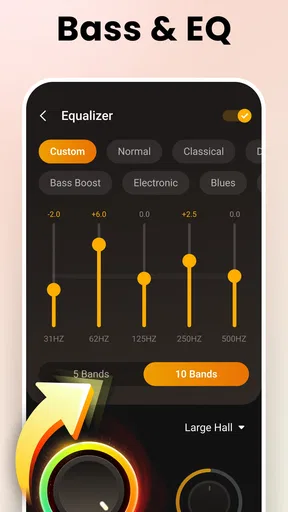
When I’m listening through headphones, I’d treat the equalizer as a small adjustment tool, not a promise that every recording will suddenly sound better. A gentle change can make a particular set of headphones more comfortable, but heavy boosts can make tracks feel harsh or muddy. I’d save a familiar setting for a regular listening situation and revisit it when changing headphones, rather than constantly chasing a dramatic sound.
Where the extra controls help
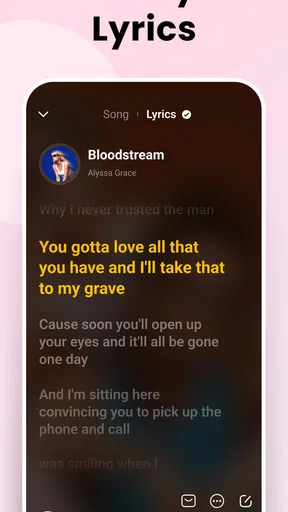
Lyrics can make the player more enjoyable when I want to follow a song or check a line I’ve been mishearing. They are most useful as a convenience within the listening session, rather than a reason to choose the app on their own. If a track’s lyrics aren’t available in the way I expect, I’d simply keep listening or look them up separately instead of letting that interrupt the playlist.
The sleep timer is a good fit for a specific habit: putting on music at bedtime without wanting it to continue indefinitely. I’d set it before settling in, then leave the phone alone. It’s a modest control, but one that can make an offline player more comfortable for evening use than a basic file browser, where playback may require more manual attention.
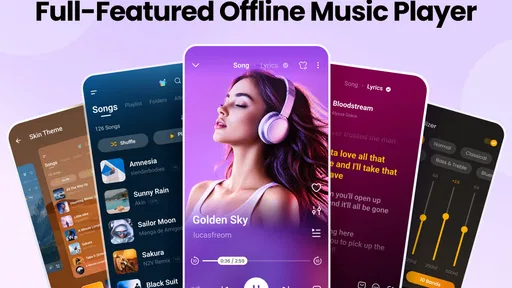
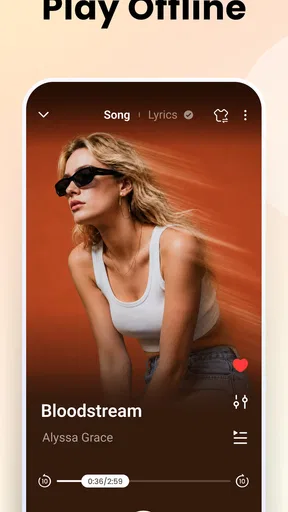
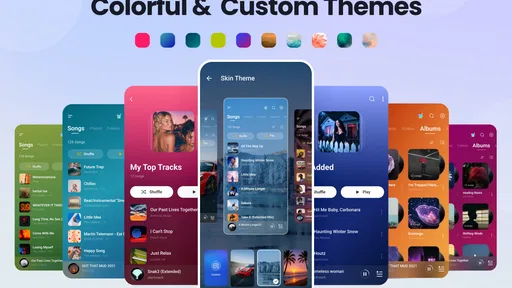
Themes and album artwork add a more personal feel to browsing. I like that visual choice can make a library easier to scan and more pleasant to revisit, though it won’t matter much to someone who starts playback from a headset control or keeps the screen off. If appearance is part of the enjoyment for you, the visual options are a welcome extra; if not, they can stay in the background.
Who it suits, and where it falls short
Music Player & MP3 Player is developed by InShot Inc. and sits in the music and audio category. It is free to install, with optional in-app purchases ranging from $0.99 to $6.99 per item; the app is rated for Everyone. Its average rating is 4.8 from around 4.3 million ratings, and it has passed 100 million installs. Those figures suggest broad uptake, but I’d still judge it by whether its local-library approach matches how I listen.
It should suit people who keep MP3s or other supported audio files, want an equalizer and tag editor nearby, and prefer listening without depending on streaming. It is less compelling if nearly all your music comes from a subscription catalog, if you need to discover new artists inside the player, or if you want a fully automated library with no file organization at all. In those cases, a streaming service or a player built around a different library workflow may be a better fit.
Compared with a barebones player, the combination of sound controls, lyrics, themes, and tag editing gives me more ways to shape the experience. Compared with a streaming app, though, it has a different job: it is centered on personal files rather than an online catalog. That makes it a useful companion for music I already own or have saved, but not a replacement for discovery or subscription access.
In an ordinary evening scenario, I’d put together a low-key playlist, make a small equalizer adjustment for my headphones, and set the sleep timer before reading. The next day, I could choose a more energetic set for a walk. That is the sort of repeatable, low-effort routine where a local player earns its place; the key is having the tracks ready and labelled well enough to find.
First Impressions
From the get-go, this app catches your eye with its sleek and friendly design. The interface is super intuitive, meaning you won't be stuck fumbling around trying to figure out where everything is. Everything is laid out in a way that just makes sense, which is always a plus in my book. You can tell that the developers really put a lot of thought into how users would interact with it.
Features That Hit the Right Note
Let’s talk features because that’s where the app truly shines. First off, the sound quality is top-notch. Whether you’re into classical, rock, or hip-hop, this app ensures that your tunes sound crisp and clear. You can really feel the bass thump, and the treble is just right.
One of the standout features is the equalizer. It’s like your personal sound engineer. You can adjust the sound settings to fit your preference or choose from the preset options if you’re feeling a bit lazy. I love tweaking the settings when I switch from my morning rock playlist to some soothing jazz in the evening.
Plus, the app supports a wide range of audio formats. So, no more converting files or dealing with compatibility issues. Just load up your songs, and you’re good to go.
Usability and Functionality
Speaking of using the app, the playlist feature is super handy. You can create as many playlists as your heart desires, and organizing them is a breeze. Got a party coming up? Quickly put together a playlist that’ll keep everyone dancing all night long. The app also offers smart playlists that automatically group songs based on your listening habits.
Another cool feature is the lyrics display. I’m a sucker for singing along, and having the lyrics right there on the screen means I can belt out my favorite tunes anytime, anywhere. No more guessing the words or using another app to find them!
And let’s not forget about the sleep timer. For those of us who love to drift off to music, this is a lifesaver. Set the timer, and the app will automatically stop playing after your chosen duration. It’s the little things that make a big difference.
Visual Appeal
The app isn’t just functional; it’s also a feast for the eyes. The customizable themes allow you to change the look and feel of the app according to your mood. Whether you’re feeling dark and mysterious or bright and cheerful, there’s a theme for that.
Album art is displayed beautifully, giving a visual cue to your music that’s both nostalgic and modern. It’s like flipping through a digital vinyl collection.
Where the workflow can break
The main friction point is the condition of the music library itself. A missing track, duplicate copy, or messy file name is not something an equalizer can fix, and it can make browsing feel less smooth than the interface suggests. I’d check that my files are available and use the tag editor to correct the most confusing labels before creating several playlists. That small bit of setup pays off later, especially when choosing music quickly on the move.
There is also a difference between an app being offline-friendly and every part of a listening session being effortless. If I expect lyrics to appear for every song, or assume a theme will make a large library easier to organize, I may be disappointed. I’d treat lyrics as a useful extra and themes as presentation, while relying on clear tags and playlists for the actual organization.
For a phone with limited storage, keeping a large music collection locally may be a poor fit. I’d prioritize the albums and playlists I reach for most rather than trying to carry everything. Someone who mainly streams can avoid that file-management trade-off with a service built around online access, while someone with a modest, carefully chosen collection gets the simpler offline routine this player is designed to support.
Compatibility, cost, and the right expectations
The app was released on June 9, 2017, and its current version is 4.1.1.182, with Android 6.0 as the minimum operating system. That makes checking the device’s Android version a sensible first step before installing. Its free entry point makes it easy to try with a small collection, while the listed optional purchases mean I would check what an individual paid item offers before deciding whether it matters to my use.
One question I’d ask before switching is whether this can replace my usual music app. If my usual app is a streaming service, probably not: the two serve different needs. If I’m already keeping audio files on the phone and mostly want a more capable way to browse and play them, it may be a practical replacement for a very basic player. I’d test it with a few familiar tracks first, then decide whether the library flow feels comfortable.
Another useful check is how I actually listen. If I often keep the screen off, the visual themes and album art are secondary; if I browse by album or artist, they can make choosing a record feel more inviting. If I listen at bedtime, the timer is a meaningful convenience. Thinking about these habits before installing helps me focus on the controls I’ll use instead of judging the app by a long feature list.
Final Thoughts
All in all, the app is a solid choice for anyone looking to upgrade their music listening experience. It’s packed with features that enhance sound quality and usability, while also offering a visually appealing interface. It’s like having a DJ in your pocket, always ready to play your favorite tracks at the drop of a hat.
If you’re on the hunt for a music player that’s both feature-rich and user-friendly, this app is definitely worth checking out. Trust me, your ears will thank you.
My recommendation is to try it with the kind of music you already play every week, not with a theoretical library you might build someday. If the tracks are easy to locate, the equalizer feels useful without constant tweaking, and the timer or lyrics fit your routine, the app has a clear role. If your listening depends on streaming discovery or you would rather never manage local files, I’d choose a different kind of music app instead.
Privacy and Permissions
See what permissions an app requests and how it handles your data.
- Location
- approximate location (network-based), precise location (GPS and network-based)
- Photos/Media/Files
- read the contents of your USB storage, modify or delete the contents of your USB storage
- Storage
- read the contents of your USB storage, modify or delete the contents of your USB storage
- Camera
- take pictures and videos
- Wi-Fi connection information
- view Wi-Fi connections
- Other
- view network connections, change network connectivity, connect and disconnect from Wi-Fi, full network access, control vibration, prevent device from sleeping, modify system settings
Verdict
Strengths of Music Player & MP3 Player
- User-friendly interface for easy navigation.
- Supports a wide range of audio formats.
- Customizable equalizer settings.
- Offline playback feature available.
- Minimal battery consumption.
Limitations of Music Player & MP3 Player
- Contains ads even in premium version.
- Limited theme customization options.
- Occasional playback glitches.
- No lyrics support for all songs.
- Requires frequent updates for stability.
Other Releases by InShot Inc.
View All
All Video Downloader
Video Players & Editors4.7

Video Downloader
Video Players & Editors4.7

Video Player All Format
Video Players & Editors4.8

Photo Editor - Polish
Photography4.8
Similar Picks in This Category
View All
YouTube Music
Google LLC4.4

Samsung Music
Samsung Electronics Co., Ltd.3.8

Spotify: Music and Podcasts
Spotify AB4.3

JioSaavn - Music & Podcasts
Saavn Media Limited4.3

Lark Player:Music Player & MP3
Lark Player Studio - Music, MP3 & Video Player4.6

StarMaker: Sing Karaoke Songs
SKYWORK AI PTE. LTD.4.3
Frequently Asked Questions
What features does the Music Player & MP3 Player offer?
The Music Player & MP3 Player comes with a variety of features designed to enhance your listening experience. It supports multiple audio formats, allows you to create and manage playlists, and offers a powerful equalizer. Additionally, it includes options for sleep timers, customizable themes, and offline playback, making it an all-in-one music solution.
Is the Music Player & MP3 Player app free to use?
Yes, the app is free to download and use. However, it may offer in-app purchases or a premium version that unlocks additional features, such as ad-free listening and advanced customization options. Users can choose to upgrade if they find the extra features beneficial for their needs.
Does the app support offline music playback?
Absolutely! The Music Player & MP3 Player supports offline playback, allowing you to listen to your favorite tracks without an internet connection. Simply download your music files to your device, and the app will organize and play them seamlessly, making it ideal for on-the-go listening.
How user-friendly is the Music Player & MP3 Player app?
The app is designed with a user-friendly interface that is easy to navigate. It features intuitive controls and a clean layout, making it accessible for users of all ages. Whether you’re creating playlists or adjusting the equalizer, the app offers straightforward options to enhance your music experience.
Is the Music Player & MP3 Player app compatible with all devices?
The app is compatible with most Android and iOS devices, offering a seamless experience across platforms. Ensure your device meets the minimum operating system requirements for optimal performance. Regular updates are available to improve compatibility and introduce new features, so keeping the app up-to-date is recommended.
